See the database without becoming the database admin
Explorer is the governed client for every connected engine. Engineers browse objects, preview rows, run SQL, and open an ER diagram under the role that environment allows not under a shared production password.
A full client, with the dangerous parts gated
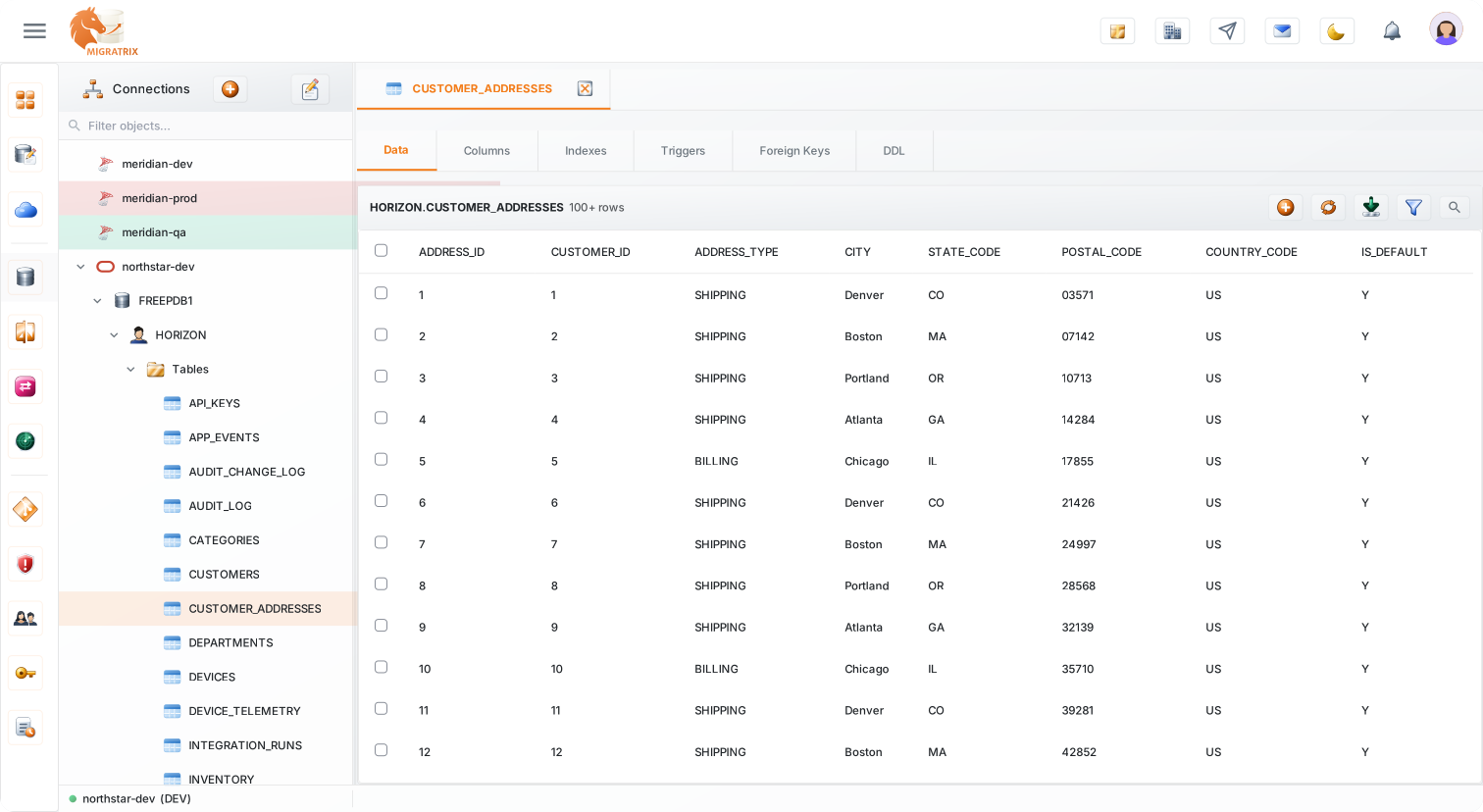
Each provider has its own navigator. Open a table and move between data, columns, indexes, DDL, dependencies, and routines without leaving the page.
Write and run SQL in a Monaco editor tuned to the connected engine. Production defaults to read-only; writes require an explicit permission on that environment.
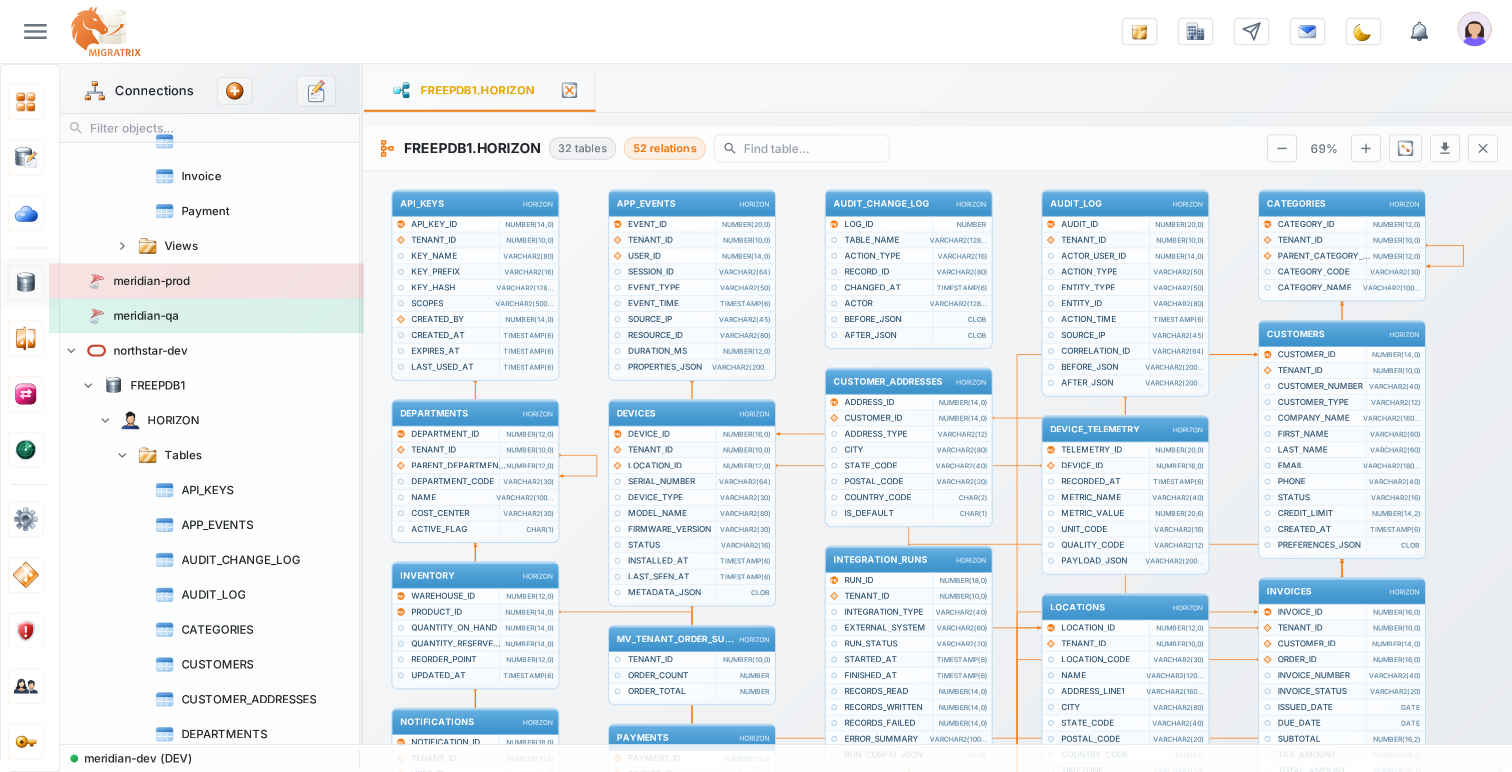
Render tables and foreign keys as an SVG diagram with zoom, pan, and search. Export the diagram when you need it in a design review, not as a screenshot of a whiteboard.
Sort any column, and stack filters on the data grid with =, !=, <, >, LIKE, IN, and IS NULL. Find and replace across cells with Ctrl+F, one match at a time or all at once, with match case. Replacements land as pending grid edits you review before saving, and only where you hold write permission.
Every user gets their own role on each environment, built from granular permissions: read, write, export, import, or delete data; create, alter, or drop schema; run queries. Define your own roles, and the same person can be an editor on DEV and read-only on PROD.
Describe the question in English and get a query against the live schema. Generation uses OpenAI. The SQL still passes through the same risk checks and environment permissions as anything typed by hand.
What stops a browse session becoming an incident
| Control | How it works |
|---|---|
| Per-environment roles | The same person can hold editor on DEV and viewer on PROD. Access is not global across the workspace. |
| Production read-only default | Writes in production require an explicit grant. Investigation does not quietly become a data fix. |
| Attributed queries | People sign in as themselves. The audit log records who ran which query against which environment. |
| Export | Table data and query results can be exported as CSV, SQL, or JSON from Explorer, still under the same permissions. |
| Credentials | The Executor holds the database password on a machine you control. Explorer never shows it and the platform never stores it. |
All 17 engines, with engine-shaped UI
Explorer is the one capability that covers every connected engine. Schema comparison, migration, and CDC are narrower those limits live on the databases page, not here.
Does Explorer mask or anonymise data?
No. It governs who can see rows and logs the access. If you need irreversible masking of exports, that is outside this product today.
Can I use it as a replacement for a DBA workstation?
For browse, query, and routine DML in lower environments, yes. It is not a full replacement for vendor-specific admin consoles on engine internals, replication, or storage.
Tabs change with the object, and with the engine
Nothing is a generic grid with a SQL box taped on. Opening a table, a view, or a procedure shows a different set of tabs, and MongoDB relabels Data and Columns to Documents and Schema.
| Object | Tabs |
|---|---|
| Table | Data, Columns, then Indexes, Triggers, Foreign Keys, and DDL when the engine supports them. |
| View | Data, Columns, Dependencies, Definition. |
| Materialized view | Definition, Columns, Data, Dependencies. |
| Procedure | Definition, Parameters, Dependencies, Execute. |
Limits, paging, and how a write actually runs
| Behaviour | Default |
|---|---|
| SQL editor row limit | 100 rows on a new tab. The limit control accepts 1 to 100,000. Page sizes in the result grid are 20, 50, or 100. |
| Table data grid | Loads 100 rows at a time with infinite scroll. Load-more is blocked while you have unsaved grid edits, so a half-edited row cannot vanish under the next page. |
| MongoDB data tab | Starts at 25 documents, not 100, because document payloads are larger. |
| Single SELECT or WITH | Bypasses the script runner and has the row limit applied automatically, unless the SQL already contains LIMIT, FETCH, or TOP. |
| Row DML | Insert, update, and delete go through a transactional path. DDL does not a CREATE that fails halfway is not rolled back as a unit. |
| Permissions | Grid edit, delete, and restore require Data write or delete on that environment. Schema create, alter, and drop are separate grants checked on the Executor. |
Take something out without taking the credentials with you
Choose Schema and data, Schema only, or Data only. Format is SQL, JSON, or CSV. SQL export can prepend DROP IF EXISTS before CREATE. The default is SQL with schema and data. The same environment permissions still apply.
Search, zoom, fit to screen, export SVG. It is a foreign-key diagram of the schema in front of you, not a lineage product across warehouses.
The prompt is sent with the schema of what you are browsing, and every generation is recorded as a data-access event. AI SQL comes with a monthly allowance per organisation and is not switched on for every plan by default.